
Overview
This article advises how to connect and configure your COMPUSHIFT controller to communicate with a Haltech ECU via CAN bus.
Setup
-
Be sure you have connected the two systems together with the correct CAN bus cable kit, usually. The black tee and terminator plugs into the gray two pin CAN plug on the COMPUSHIFT, and the flying lead set goes to the Haltech controller.
-
Set the engine type on the COMPUSHIFT to be “Haltech Elite” or “Haltech Platinum” as required.
-
Enable the CAN protocol on the Haltech Elite as follows:
-
Run the Haltech ECU Manager software and connect to the Haltech ECU.
-
Once connected go to the Setup –> Main Setup panel
-
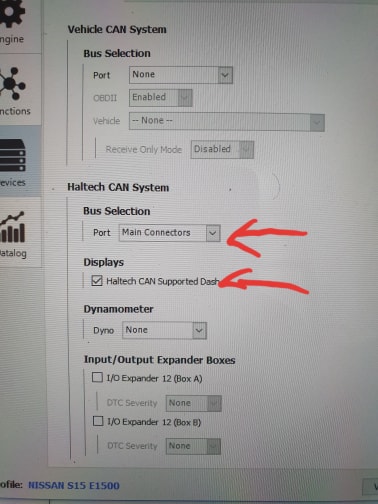
In the “Haltech CAN System” menu, choose “Main Connectors” under “Bus Selection” and check the “Haltech CAN Supported Dash” checkbox as shown below.
-
-
Restart both controllers. They should now be communicating correctly. Engine speed and throttle position should correct show on the CS Setup dashboard.
Do NOT drive the vehicle until you have confirmed CAN communications are working properly and you have no trouble codes.
You can diagnose CAN bus problems by going to Diagnostics / Network Diagnostics on the CS Setup App. The CAN 1 Receive Count should be steadily increasing when the ECU’s are communicating correctly. The error counts should always be 0. If you do have errors, confirm that the CAN bus baud rate is set to 1000 in Network Setup.
Related articles
- Connectors Used In CAN Networks
- Connecting COMPUSHIFT to Holley Sniper EFI or Holley TerminatorX
- Connecting COMPUSHIFT to Holley EFI / Racepak
- HGM CAN Bus Messaging
- Connecting COMPUSHIFT to AEM ECU's
- Connecting COMPUSHIFT to Emtron
- Connecting COMPUSHIFT to Cummins R2.8 CM2220
- Connecting COMPUSHIFT to Chrysler HEMI Crate Engine
- Adding an ECU to a CAN Bus Network
- Connecting COMPUSHIFT to Edelbrock ProFlo 4
- Connecting COMPUSHIFT to Haltech Elite or Haltech Platinum
- Connecting COMPUSHIFT to Megasquirt
- Using and Working with CAN Bus
- Connecting COMPUSHIFT to Link G4+ ECU
- Connecting COMPUSHIFT to J1939 Engine Management